

Language Selector
The checkout process supports a multilingual experience to cater to global audiences. This functionality includes a language selector and the ability to preselect and display languages, providing a seamless and localized experience for users. The Language Selector enables customers to choose their preferred language from a drop-down menu. The selector ensures clarity and ease of navigation for users preferring different languages and accommodates diverse customer bases with language preferences tailored by region. Once a language is selected all the text on the page automatically updates to display in the chosen language. Localized language options help users navigate the checkout process easily. Shopping in a local language reduces confusion and increases the likelihood of completing purchases. The ability to choose a local language appeals to a wider audience by catering to non-English speaking customers. Integration is seamless, and the language selector works dynamically without requiring users to restart their checkout journey after a language change. The checkout can be configured to automatically refresh and display product details in the newly selected language once selected. The language selector feature ensures consistency in language presentation across product descriptions and checkout elements. Using the Language Selector The Language Selector can display at the bottom or top of the page. When at the top of the page, the selector provides easy access for users to switch languages before proceeding. If the selector is at the bottom it helps users to change the language after navigation through checkout sections.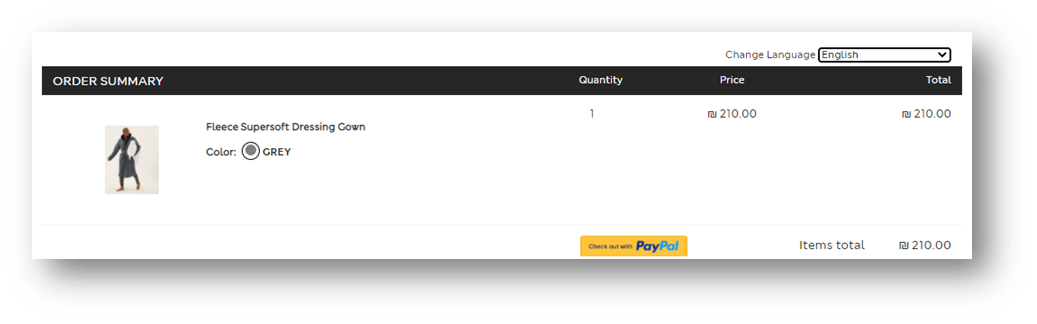
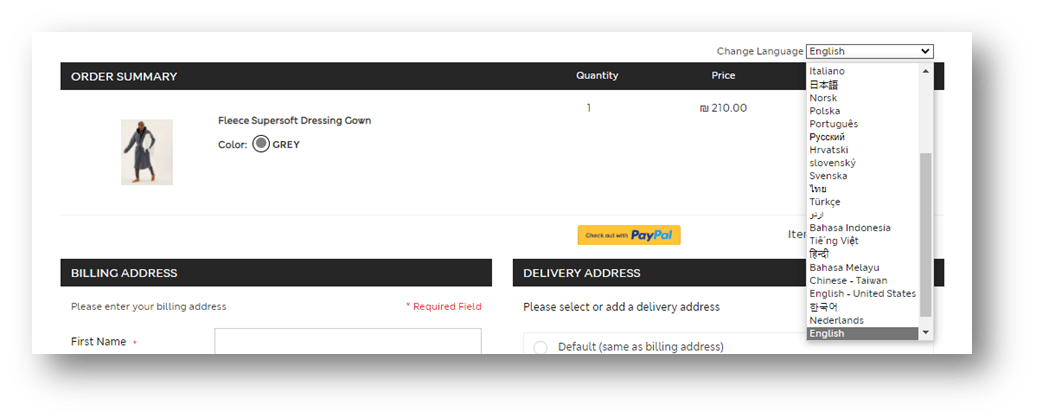
| Arabic Chinese (Simplified) Chinese (Traditional) Chinese (Taiwan) Croatian Czech Danish Dutch English UK English US Finnish French | French (Canadian) German Greek Hebrew Hindi Indonesian Italian Japanese Korean Malay Norwegian Polish | Portuguese Romanian Russian Slovak Spanish Spanish (Latina America) Swedish Thai Turkish Urdu Vietnamese |
|---|
PreferredCultureCode received in the SendCart request. The preselected language ensures a more localized and tailored experience from the outset.
Multi-Language Checkout Input
The checkout process supports multi-language input. Customers can input information in their preferred language, increasing satisfaction and reducing entry errors. The checkout supports a wide range of languages to accommodate global merchants and shoppers. Merchants can tailor the input languages based on regions, ensuring compliance with local preferences and regulations.- Regional Support: A merchant operating in Europe can enable input for German, French, and Italian, catering to their multilingual customer base.
- Localized Marketing: Merchants in the Middle East can support Arabic and Farsi for a localized and culturally relevant checkout experience.
- Global Operations: International merchants can enable a wide range of languages to support their global customer base.
- Merchant Configuration: Merchants can define allowed languages per country or region via the checkout settings.
- Dynamic Input Validation: The system dynamically validates input fields based on the configured languages, ensuring compliance and accuracy
Supported Languages
The following languages are supported for input during the checkout process:| Arabic Bulgarian Catalan Chinese (Simplified) Czech Danish German Greek English Spanish Finnish French Hebrew Hungarian Icelandic Italian Japanese | Korean Dutch Norwegian Polish Portuguese Romanian Russian Croatian Slovak Albanian Swedish Thai Turkish Urdu Indonesian Ukrainian Belarusian | Slovenian Estonian Latvian Lithuanian Farsi Vietnamese Armenian Azeri Basque Macedonian Afrikaans Georgian Faroese Hindi Malay Kazakh Kyrgyz | Swahili Uzbek Tatar Punjabi Gujarati Tamil Telugu Kannada Marathi Sanskrit Mongolian Galician Konkani Syriac Dhivehi |
|---|
Product Name Translation
To enhance the shopping experience for global customers, Merchants can now display product titles in multiple languages during the checkout and on the order confirmation page. This feature ensures that customers see product names in their preferred language, creating a consistent and localized journey from browsing to purchase. This feature ensures that product names are translated within the checkout process and on the order confirmation page. How it works The Merchant provides translations of each product’s name and at checkout and on the order confirmation page, the system retrieves the appropriate translation. If a translation is unavailable for the specified culture, the default product name is displayed. Product names displayed in the checkout and order confirmation pages match the customer’s selected language or region. Merchants store these translated titles and ensure they are accessible during checkout. If a translation is not available for the customer’s selected language, the system defaults to the most appropriate alternative:- Exact match for the region and language (e.g., French - France).
- General language match if the region-specific title is unavailable (e.g., French - Global).
- Default title if no translation is available.
- Browsing: Customers select their preferred language or region on the merchant’s website and see the product names in their selected language.
- Order Summary: Product titles in the order summary are displayed in the customer’s selected language. This ensures clarity and consistency with what the customer saw during browsing.
- Order Confirmation: The same translated titles are shown on the confirmation page and email, reinforcing trust in the purchase process.