Step 3: Apply the order’s documents to the parcel
| For DHL orders, documents consist of: A DHL‘s Airway Bill (AWB) - attach the AWB to the parcel. If an additional AWB is printed, keep it as a reference. A Commercial Invoice - insert the invoice into a pouch and attach it to the parcel. Note The invoice is not printed in the following cases: - PLT orders (marked with PLT.png) - EU merchants shipping within the EU | EOD_Invoioce.pngDHL_AWB_SM.jpg |
|---|
Step 4: Schedule a pick-up
| If you don’t have a scheduled DHL daily pickup, you can arrange a pickup through the following screen on the Global‑e Merchant Portal:Orders > Merchant Hub > Pickup Request | DHL_Pickup_Request.jpg |
|---|
Step 5: The End-of-Day (EOD) procedure
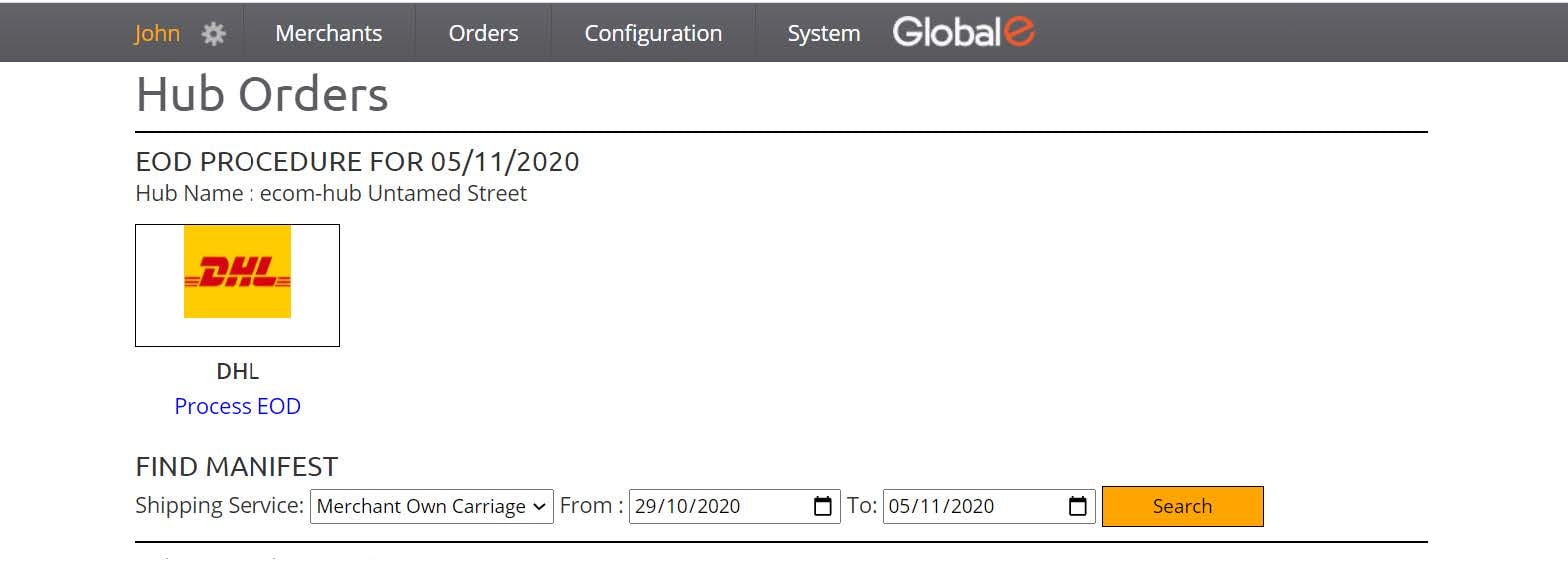
The procedure changes the status of the order in your ecommerce platform and notifies the customer that the order has been dispatched. The procedure should be performed after DHL arrives for the pick-up. To perform the End-of-Day procedure:- From the Merchant Portal, go to Orders > Merchant Hub > Process EOD.
- Click the DHL logo.
-
Confirm the number of orders.
A manifest is issued as a reference for the orders that were part of the EOD procedure.