> ## Documentation Index
> Fetch the complete documentation index at: https://pro-docs.bglobale.com/llms.txt
> Use this file to discover all available pages before exploring further.
# Viewing the Global-e Cookie Information in the Browser
The Global-e extension includes a cookie that enables the system to recognize the user, the cart, and the relevant store instance. The cookie data is stored in JSON format.
The following figure shows an example of the **GlobalE\_Gem\_Data** cookie in a browser:
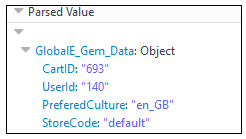 The cookie contains the following data:
| Data | Description |
| ---------------- | ------------------------------------------------------------------------------ |
| CartID | WooCommerce Cart ID. |
| UserId | The ID of the registered user. If the user is a guest, this field is set to 0. |
| PreferredCulture | Store culture code. |
| StoreCode | Technical field for store compatibility. |
The cookie contains the following data:
| Data | Description |
| ---------------- | ------------------------------------------------------------------------------ |
| CartID | WooCommerce Cart ID. |
| UserId | The ID of the registered user. If the user is a guest, this field is set to 0. |
| PreferredCulture | Store culture code. |
| StoreCode | Technical field for store compatibility. |