> ## Documentation Index
> Fetch the complete documentation index at: https://pro-docs.bglobale.com/llms.txt
> Use this file to discover all available pages before exploring further.
# Shipping Orders
## Shipping Lines
When the Global-e CrossBorder app is installed in Shopify, a shipping zone with Global-e operated countries is automatically added. The order shipping lines data is standardized by Shopify and cannot be changed.
```
"shipping_lines": [{
"id": 4525092405308,
"code": "EXPRESS_GLOBALE_DDP",
"source": "Global-e Carrier Service",
"title": "Express Courier (Air)"
```
See below for the list of possible values for the relevant fields.
* **Source**: fixed value **Global-e Carrier Service**.
* **Title**: two possible values, **Express Courier (Air)** or **Standard Courier**.
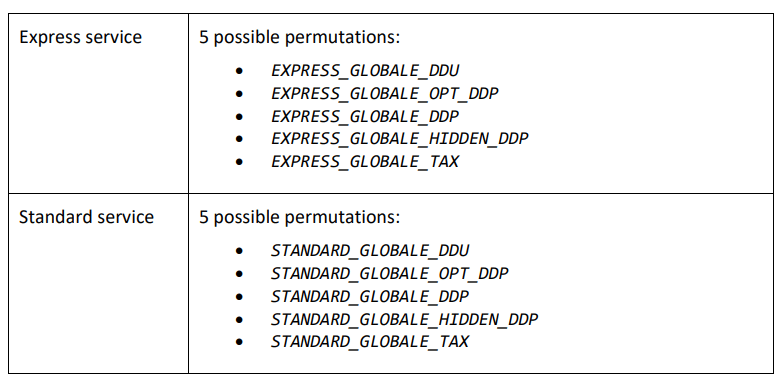
* **Code**: multiple permutations depending on service type. Will always contain ‘GLOBALE’.
 ## Shipping Information
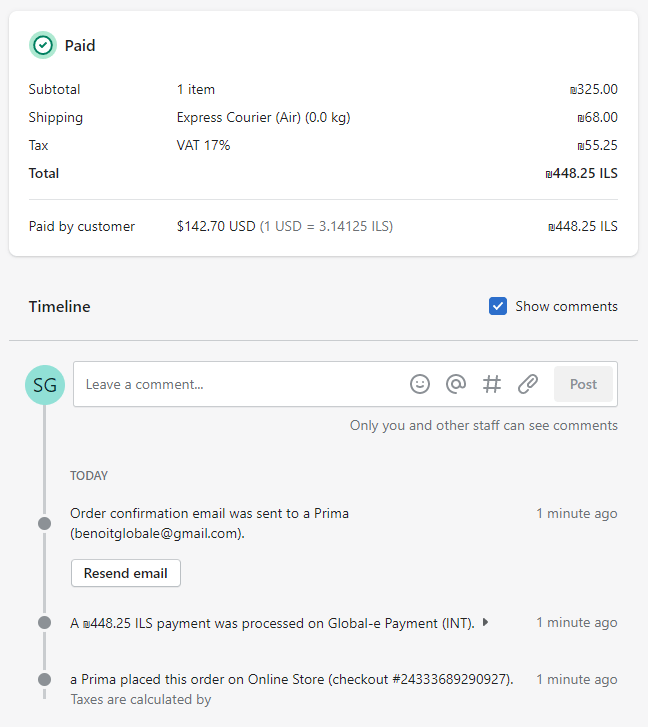
Shopify shows the carrier service level chosen by the customer in the checkout, as shown in the following figure.
## Shipping Information
Shopify shows the carrier service level chosen by the customer in the checkout, as shown in the following figure.
 ## Shipping Technical Details
To identify Global-e orders for shipping purposes, you can review the information provided by each order placed through Global-e services on our Native integration:
| shipping\_line | Value | Example |
| -------------- | ---------------------------- | ------------------------ |
| `“title”` | Service level | Standard courier |
| `“source”` | The Global‑e carrier service | Globale carrier service |
| `“code”` | Always contains `GLOBALE` | `123_GLOBALE_HIDDEN_DDP` |
An exception to this rule is if an order is placed using Shopify backup rates, or only contains virtual items – the shipping\_line will not contain a Global-e shipping method.
**EXAMPLE**
If a customer places an order on the checkout page and selects a \$10 Express Courier (Air) shipping rate on the checkout page, the order shipping lines will show:
```
"shipping_lines": [
{
"id": 3576851562671,
"code": "30022554_GLOBALE_OPT_DDP", //Always contains "GLOBALE"
"source": "Global‑e Carrier Service", //The Global‑e Carrier Service
"title": "Express Courier (Air)" //Service level
}]
```
**Notes:**
* If an order is fully paid using a gift card, the only payment gateway name will be “gift\_card”.
* If a free draft order is placed, the gateway name will be empty since there was no payment.
* Under Checkout Extensibility, credit card orders will contain the string “Global-e Onsite Payment”, otherwise, the payment gateway name will be “Global-e Payments".
Suppose these scenarios prevent you from relying on them to process Global-e orders immediately after being placed properly. In that case, you will instead need to check the shipping country to confirm whether it was a Global-e order.
## Shipping Technical Details
To identify Global-e orders for shipping purposes, you can review the information provided by each order placed through Global-e services on our Native integration:
| shipping\_line | Value | Example |
| -------------- | ---------------------------- | ------------------------ |
| `“title”` | Service level | Standard courier |
| `“source”` | The Global‑e carrier service | Globale carrier service |
| `“code”` | Always contains `GLOBALE` | `123_GLOBALE_HIDDEN_DDP` |
An exception to this rule is if an order is placed using Shopify backup rates, or only contains virtual items – the shipping\_line will not contain a Global-e shipping method.
**EXAMPLE**
If a customer places an order on the checkout page and selects a \$10 Express Courier (Air) shipping rate on the checkout page, the order shipping lines will show:
```
"shipping_lines": [
{
"id": 3576851562671,
"code": "30022554_GLOBALE_OPT_DDP", //Always contains "GLOBALE"
"source": "Global‑e Carrier Service", //The Global‑e Carrier Service
"title": "Express Courier (Air)" //Service level
}]
```
**Notes:**
* If an order is fully paid using a gift card, the only payment gateway name will be “gift\_card”.
* If a free draft order is placed, the gateway name will be empty since there was no payment.
* Under Checkout Extensibility, credit card orders will contain the string “Global-e Onsite Payment”, otherwise, the payment gateway name will be “Global-e Payments".
Suppose these scenarios prevent you from relying on them to process Global-e orders immediately after being placed properly. In that case, you will instead need to check the shipping country to confirm whether it was a Global-e order.