> ## Documentation Index
> Fetch the complete documentation index at: https://pro-docs.bglobale.com/llms.txt
> Use this file to discover all available pages before exploring further.
# Reports
## Reconciliation Report
The**Reconciliation Report**is a structured financial data file provided by Global-e to merchants. It offers comprehensive details of all your sales. The report is generated automatically once a week and the Global-e Finance team is available for any questions regarding the files or data.
A detailed Reconciliation Report contains:
* A breakdown of each order by product, including a breakdown of cart and product discounts.
* A summary of all orders dispatched during the period.
* A summary of all related shipping and Duties and Taxes costs and subsidies.
* A summary of refunds issued within the period, and a breakdown of these refunds by product.
* A summary of all returns costs and subsidies for returns that took place during the period.
* A summary of all totals in the report for ease of invoicing.
For a detailed explanation of the Reconciliation Report, please see the [Reconciliation Report](/reconciliation-report).
### Accessing Your Reconciliation Report
This section tells you how to access your Reconciliation report.
1. Navigate to Merchants > Reports > Reconciliation Report from the top menu.
2. Select a merchant from the **Merchant** menu.
3. Select a date period from the **Report** menu.
The Reconciliation Report page is displayed showing a summary of the latest billing period.
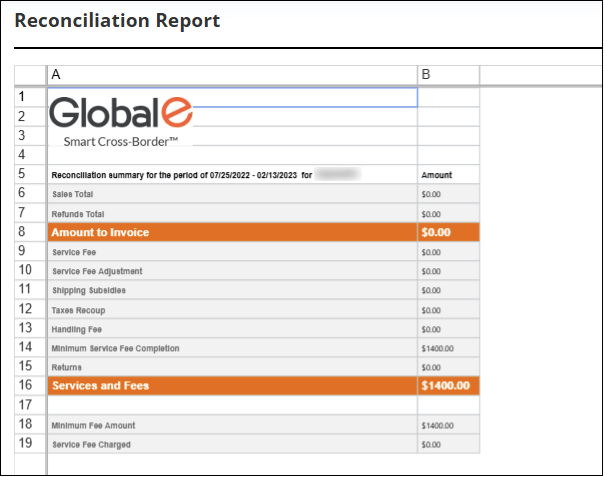 The Reconciliation Report is presented in your local (merchant) currency, and the information is aligned with the rules and regulations of your specific country.
### Downloading and Printing Reconciliation Reports
From this screen you can also download or print your reconciliation reports or invoices by doing one or more of the following:
* **Download Report** - to download the Reconciliation Report.
* **Print** - to print the Reconciliation Report.
* **Invoice** - to download the invoice associated with the selected report.
The Reconciliation Report is presented in your local (merchant) currency, and the information is aligned with the rules and regulations of your specific country.
### Downloading and Printing Reconciliation Reports
From this screen you can also download or print your reconciliation reports or invoices by doing one or more of the following:
* **Download Report** - to download the Reconciliation Report.
* **Print** - to print the Reconciliation Report.
* **Invoice** - to download the invoice associated with the selected report.