> ## Documentation Index
> Fetch the complete documentation index at: https://pro-docs.bglobale.com/llms.txt
> Use this file to discover all available pages before exploring further.
# Loyalty Points
## Overview
Global‑e cartridges support using Loyalty Points cards on the Checkout page.
The cartridges contain the required functionality and implementation, using SFCC custom objects.
## Using Loyalty Points Cards
* For registered User who have Loyalty Point Cards in the ‘SendCart’ request is sent info about Loyalty Points can be used and earned on the Global-e checkout.
Merchant’s development team should override ‘loyaltyPoints.js' by path: `./cartridge/models/globale/sendCart/decorators/loyaltyPoints.js`
The following information should be sent by `SendCart`:
* **LoyaltyCreditPointsEarned** - Loyalty points to be earned from the purchase.
* **LoyaltyPointOriginalValueForSpend** - Loyalty points in conversion to money. Amount denoted in the currency code of `LoyaltyPointOriginalCurrencyForSpend` attribute.
* **LoyaltyPointOriginalCurrencyForSpend** - Currency code.
* **LoyaltyCreditCode** - ID of Loyalty Card.
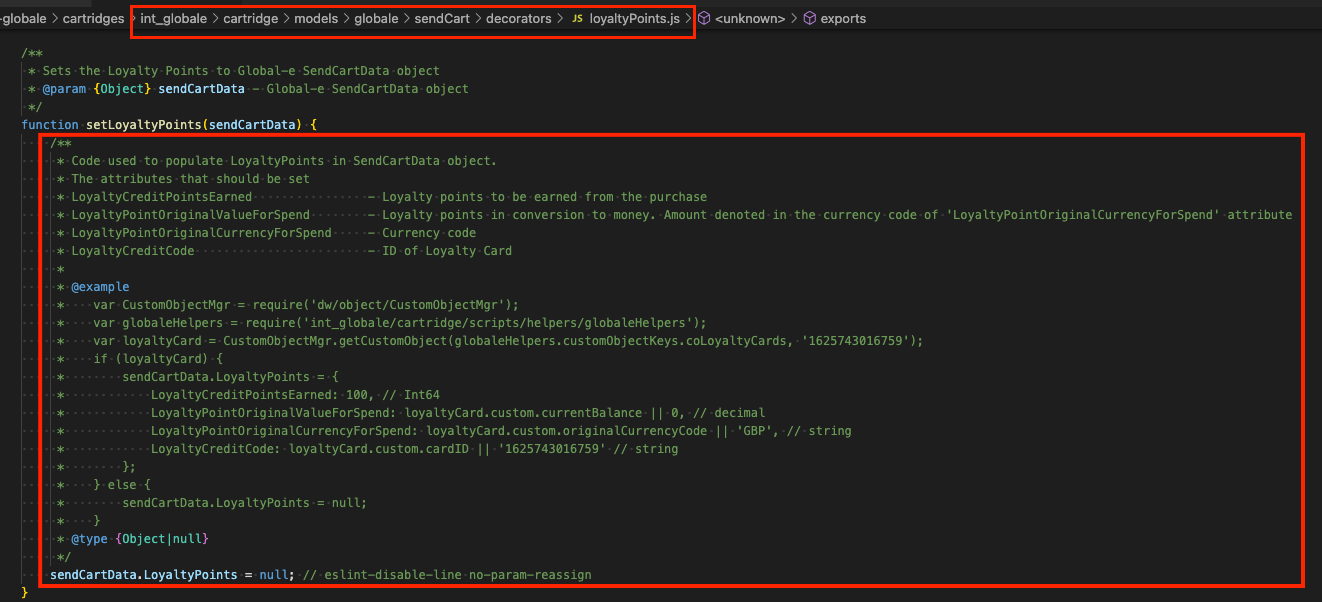 * Loyalty Points can be used, by entering the amount on the Global-e Checkout page, and pressing the ‘redeem’ button.
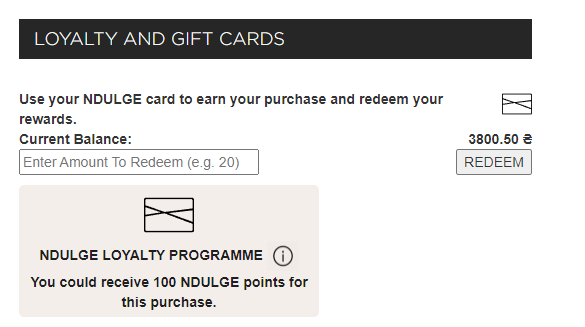 * Validate: Loyalty points are validated on the Global-e side, according to data sent in the `SendCart` request.
* If the amount of loyalty points entered is not valid, an error message is displayed.
* Validate: Loyalty points are validated on the Global-e side, according to data sent in the `SendCart` request.
* If the amount of loyalty points entered is not valid, an error message is displayed.
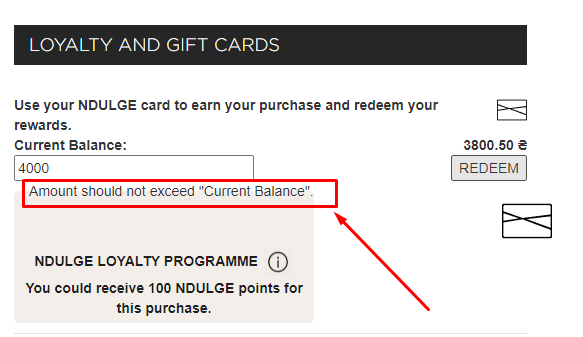 * If the amount of loyalty points is valid – the loyalty points are converted to the Checkout currency and the User is notified of the successful operation. The Totals section displays the amount compensated from the Loyalty Points Card.
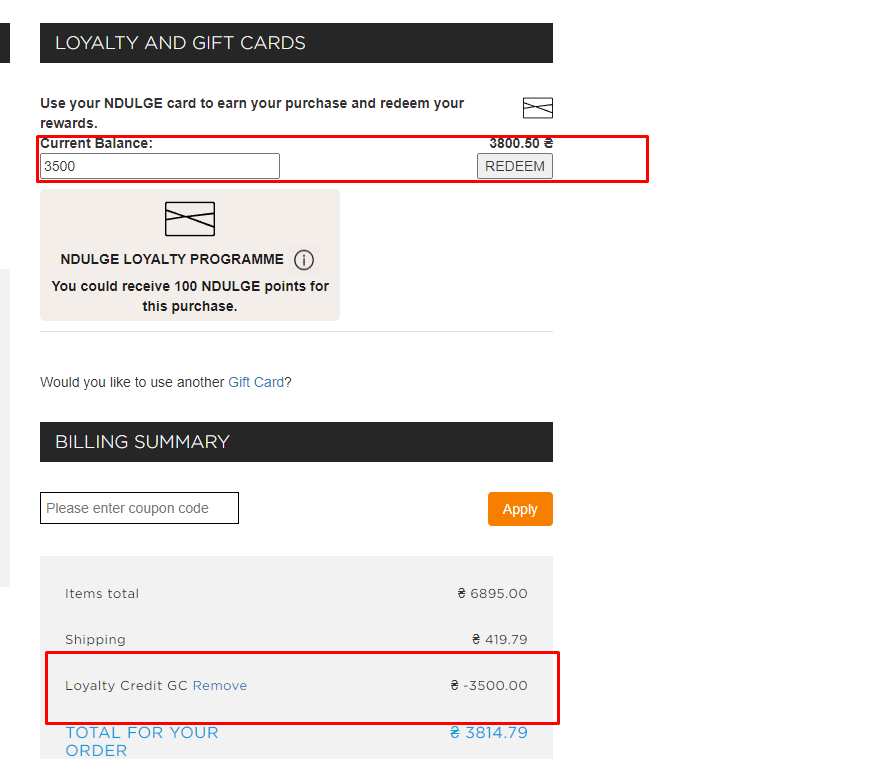 * If the amount of the entered points covers the entire order's amount – the User can create an order without any additional payments.
* If the amount of the entered points covers only part of the order's total amount - the User should select a payment method to pay the rest.
**Redeem API call**
* After a User clicks on ‘PAY AND PLACE ORDER' and successful validation on the Global-e side - from the Global-e to SFCC is sent 'Redeem’ request.
* When an order is created on the Global-e side (and before creation on the SFCC side) - Global-e sends a “Redeem” request to the SFCC.
Note: At that point, the order is created only on the Global-e side.
* The request’s payload is parsed and on the SFCC or external system(Givex, etc.) side is handle 'redeem' operation for the card.
* A response is sent from SFCC to Global-e.
* If the 'Redeem' operation for the card was not successful, and error message displayed and the order is not created on the SFCC side.
* If the 'Redeem' operation for the card was successful, a confirmation opens and the order is created on the SFCC side.
**Refund API call**
A Refund request is sent from Global-e to SFCC if a ‘refund' case is created on the Global-e side. For example: if the order is set to ‘Cancelled' on the Global-e side.
**Used ’Loyalty Cards’ details**
Information on used cards is added to the APIs of ‘Send Order To Merchant' and 'Payment Notification’ API requests.
## Required customization
Demo implementation in Global-e cartridges was done based on SFCC custom objects with type 'DEMO\_GLOBALE\_LOYALTY\_CARDS'.
The project’s development team should override demo implementation and add a ‘Loyalty Card' provider depending on the project’s needs.
Should be overridden:
* **Loyalty Card Provider** by path: `./scripts/globale/alternativePayments/providers/LoyaltyCardProvider.js`
* **Loyalty Points decorator** file by path:`./models/globale/sendCart/decorators/loyaltyPoints.js`
### Summary
The demo implementation (that is based on using SFCC custom objects.) was made with a simple structure as a test example which allows understanding of main things which can be used in the scope of the 'Loyalty Points Cards’ feature.
* If the amount of the entered points covers the entire order's amount – the User can create an order without any additional payments.
* If the amount of the entered points covers only part of the order's total amount - the User should select a payment method to pay the rest.
**Redeem API call**
* After a User clicks on ‘PAY AND PLACE ORDER' and successful validation on the Global-e side - from the Global-e to SFCC is sent 'Redeem’ request.
* When an order is created on the Global-e side (and before creation on the SFCC side) - Global-e sends a “Redeem” request to the SFCC.
Note: At that point, the order is created only on the Global-e side.
* The request’s payload is parsed and on the SFCC or external system(Givex, etc.) side is handle 'redeem' operation for the card.
* A response is sent from SFCC to Global-e.
* If the 'Redeem' operation for the card was not successful, and error message displayed and the order is not created on the SFCC side.
* If the 'Redeem' operation for the card was successful, a confirmation opens and the order is created on the SFCC side.
**Refund API call**
A Refund request is sent from Global-e to SFCC if a ‘refund' case is created on the Global-e side. For example: if the order is set to ‘Cancelled' on the Global-e side.
**Used ’Loyalty Cards’ details**
Information on used cards is added to the APIs of ‘Send Order To Merchant' and 'Payment Notification’ API requests.
## Required customization
Demo implementation in Global-e cartridges was done based on SFCC custom objects with type 'DEMO\_GLOBALE\_LOYALTY\_CARDS'.
The project’s development team should override demo implementation and add a ‘Loyalty Card' provider depending on the project’s needs.
Should be overridden:
* **Loyalty Card Provider** by path: `./scripts/globale/alternativePayments/providers/LoyaltyCardProvider.js`
* **Loyalty Points decorator** file by path:`./models/globale/sendCart/decorators/loyaltyPoints.js`
### Summary
The demo implementation (that is based on using SFCC custom objects.) was made with a simple structure as a test example which allows understanding of main things which can be used in the scope of the 'Loyalty Points Cards’ feature.